
我有两台磊科 N60 Pro ,刷了 OpenWRT 25.12.6 作为纯 AP 用,都开启了 802.11r ,但主流的手机、平板跨 AP 漫游都很慢,几乎要等到其中一个 AP 完全没信号的时候,才会切换到另一个 AP。
求大佬解答可能原因。
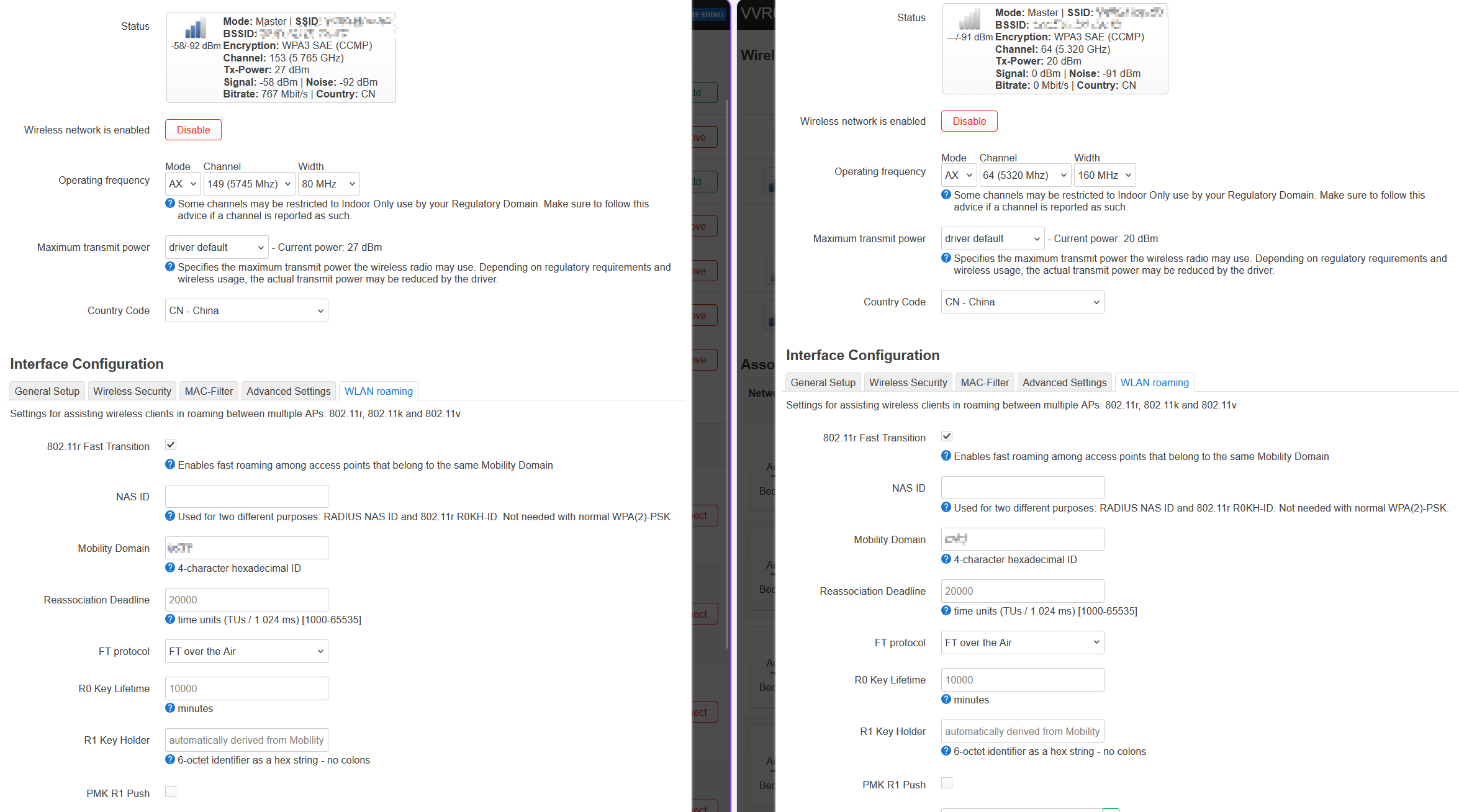
详见上图
我有两台磊科 N60 Pro ,刷了 OpenWRT 25.12.6 作为纯 AP 用,都开启了 802.11r ,但主流的手机、平板跨 AP 漫游都很慢,几乎要等到其中一个 AP 完全没信号的时候,才会切换到另一个 AP。
求大佬解答可能原因。
详见上图
 |
datocp1 day ago
1
#!/bin/sh
iw dev $1 station dump >/tmp/mca_dump.out grep -Eo ..\(\:..\){5} /tmp/mca_dump.out >/tmp/mac.lst #for i in 88:cb:87:57:f0:a0 00:f1:40:10:01:be 5c:f8:a1:e4:fa:e1 #do echo $i>>/tmp/wmac.tmp;done #>/tmp/wmac.tmp #xcl=/tmp/wmac.tmp #_f=/tmp/mac.lst #if [ -e $xcl ] ; then # while read kmac ; do # sed -i -e "/${kmac}$/d" $_f # done < $xcl;fi #>/tmp/bmac.lst # for i in $(cat /tmp/mac.lst); do signal=`grep -A9 "$i" /tmp/mca_dump.out | sed -n "/signal/p" |grep -o "[0-9]\+" | head -1` if [ $signal -gt 80 ] ;then #设置信号强度小于多少则条件成立 #echo $i>>/tmp/bmac.lst # #hostapd_cli disassociate $i interface $1 ubus call hostapd.$1 del_client '{"addr":"'"$i"'", "reason": 5, "deauth": True, "ban_time": 0}' & echo "`(date +"%m/%d/%Y %T")` kickmac_$1_$i signal_$signal" >> /tmp/log1; fi;done |
|
2
11r 真没啥研究,openwrt 真正测试过最快的是基于高通芯的 batman adv mesh.平时的经验习惯采购 MTK 的路由作为网关,采购高通芯片作为 AP。之前在 mtk7620/7621 时一直无视它家的 wifi,mtk7620 似乎直到 openwrt 21.02 才算正常了。
漫游的常见说法是终端发起的,据说苹果的手机-75dbm 时,它才觉得要切换。场景就是 A/B 两个 AP 两个信号的交集就是信号过渡,离 A 越来越远,离 B 越来越近,那么终端什么时候从 A 断开连接到 B 呢???不一定的,像 intel 无线网卡有根据信号 SNR 的切换机,但是 windows7 系统认为这是个浪费电的过程。只有在 2.连接到更适合的网络(连接可用) ^无线网卡将根据周围 AP 的信号强度变化,自动的连接到信号更好的 AP 接入点,实现漫游切换,由于不断的判断,会更消耗电池。 而在使用一些根据 BSSID 切换的软件连接后,怎么连都是连接到最初的那个 AP 上。 这是我自己在更早期版本的 ap,采用的方法 #!/bin/sh iw dev $1 station dump >/tmp/mca_dump.out grep -Eo ..\(\:..\){5} /tmp/mca_dump.out >/tmp/mac.lst #for i in 88:cb:87:57:f0:a0 00:f1:40:10:01:be 5c:f8:a1:e4:fa:e1 #do echo $i>>/tmp/wmac.tmp;done #>/tmp/wmac.tmp #xcl=/tmp/wmac.tmp #_f=/tmp/mac.lst #if [ -e $xcl ] ; then # while read kmac ; do # sed -i -e "/${kmac}$/d" $_f # done < $xcl;fi #>/tmp/bmac.lst # for i in $(cat /tmp/mac.lst); do signal=`grep -A9 "$i" /tmp/mca_dump.out | sed -n "/signal/p" |grep -o "[0-9]\+" | head -1` if [ $signal -gt 80 ] ;then #设置信号强度小于多少则条件成立 #echo $i>>/tmp/bmac.lst # #hostapd_cli disassociate $i interface $1 ubus call hostapd.$1 del_client '{"addr":"'"$i"'", "reason": 5, "deauth": True, "ban_time": 0}' & echo "`(date +"%m/%d/%Y %T")` kickmac_$1_$i signal_$signal" >> /tmp/log1; fi;done |
 |
bclerdx19h 13m ago via Android
3
RSSI 问题吧 |
 |
emma35h 42m ago
4
我用 Ruckus 的 Unleashed 固件,调整 smart-roam 等级,取消低协商速率,k/v/r 全开。在摆位没有问题,信号重叠区间合适的情况下,没有任何丢包,最多就算一个 1xxms 的高 ping 值。虚拟 AC 的调度功不可没。 |
 1
 Select Language