Home
Sign Up
Sign In
V2EX
›
macOS
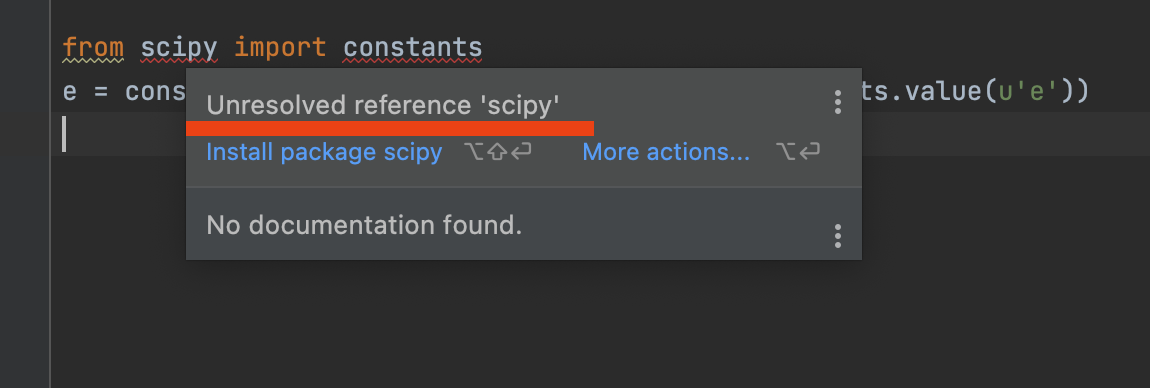
pycharm 使用 brew 安装的 anaconda 作为环境的时候检测不到已经安装的包
movq
·
Dec 25, 2021
· 2215 views
This topic created in 1777 days ago, the information mentioned may be changed or developed.
事实上 anaconda 管理的 python3.8 的 base 环境里面是有这个包的
怎么解决这个问题呢
anaconda
Python
PyCharm
brew
4 replies
•
2021-12-25 23:11:46 +08:00
rpman
Dec 25, 2021 via iPhone
1
pycharm 不知道,vsc 里刷新一下 interpreter 顺带着 LSP 也刷新一下就好
Retr0
Dec 25, 2021
2
你创建这个 project 的时候除了解释器有没有填虚拟环境的路径?没有的话试试代码开头 sys.path.append(anaconda envs 的位置)
rainboat
Dec 25, 2021
3
invalidate cache 试试
movq
OP
Dec 25, 2021
4
@
Retr0
我创建这个项目的时候是使用的系统自带环境,然后我在 Run/Debug Configurations 里面改成了 anaconda 的
我试了下,新建项目的时候选择 anaconda 的 python 就可以了,但是旧项目在 Run/Debug Configurations 里面改成 anaconda 不行
@
rainboat
试了下没用
About
·
Help
·
Advertise
·
Blog
·
API
·
FAQ
·
Privacy
·
Solana
·
1839 Online
Highest 6679
·
Select Language
创意工作者们的社区
World is powered by solitude
VERSION: 3.9.8.5 · 30ms ·
UTC 09:32
·
PVG 17:32
·
LAX 01:32
·
JFK 04:32
♥ Do have faith in what you're doing.
❯



 Select Language